Input Dialoge for android
When you want to user give quick input then used input dialog in android . It design from dialog to change its type to input.
We write all input dialog code in separate method . You can copy this code and used in your project any where to called it.
Screen Shot of Input Dialog
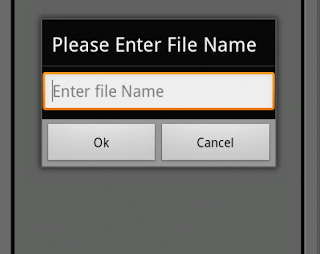
private void inputDialog()
{
AlertDialog.Builder alert = new AlertDialog.Builder(this);
alert.setTitle("Please Enter File Name");
final EditText input = new EditText(this);
alert.setView(input);
alert.setPositiveButton("Ok", new DialogInterface.OnClickListener() {
public void onClick(DialogInterface dialog, int whichButton) {
// to get text use input.getText().tostring();
}
});
alert.setNegativeButton("Cancel", new
DialogInterface.OnClickListener() {
public void onClick(DialogInterface dialog, int whichButton) {
// nothing to do when Cancel is pressed }
});
alert.show();
}
{
AlertDialog.Builder alert = new AlertDialog.Builder(this);
alert.setTitle("Please Enter File Name");
final EditText input = new EditText(this);
alert.setView(input);
alert.setPositiveButton("Ok", new DialogInterface.OnClickListener() {
public void onClick(DialogInterface dialog, int whichButton) {
// to get text use input.getText().tostring();
}
});
alert.setNegativeButton("Cancel", new
DialogInterface.OnClickListener() {
public void onClick(DialogInterface dialog, int whichButton) {
// nothing to do when Cancel is pressed }
});
alert.show();
}
We write all input dialog code in separate method . You can copy this code and used in your project any where to called it.
Screen Shot of Input Dialog

Comments
Post a Comment