How to add and remove data from Android Emulator Sd Card
First of all open Eclipse and go to DDMS menu . After that select File Explorer and open Sd card . Help are given in the following Screen Shot.
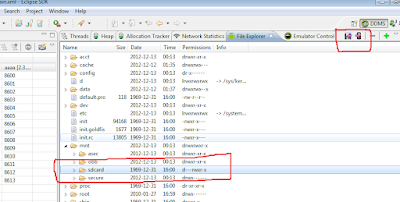
Now for adding some data like pictures , audios, videos or apps add on the Mobile symbol which are mention in the following screen shot.

Explorer menu will be displayed . Now copy the desired data into your Emulator Sd card.
If you want to copy your Sd card data to your PC than Select the second icon which will be displayed for you in file explorer menu .

Now for adding some data like pictures , audios, videos or apps add on the Mobile symbol which are mention in the following screen shot.

Explorer menu will be displayed . Now copy the desired data into your Emulator Sd card.
If you want to copy your Sd card data to your PC than Select the second icon which will be displayed for you in file explorer menu .
Comments
Post a Comment