Content Provider to load all images in Set as wallpaper in Android
res/layout/main.xml
<br />
<relativelayout xmlns:android="http://schemas.android.com/apk/res/android"
xmlns:tools="http://schemas.android.com/tools"
android:layout_width="match_parent"
android:layout_height="match_parent" ><br />
<br />
<Button
android:id="@+id/button1"
android:layout_width="wrap_content"
android:layout_height="wrap_content"
android:layout_alignParentLeft="true"
android:layout_alignParentRight="true"
android:layout_alignParentTop="true"
android:text="Change Iamges" /><br />
<br />
<ImageView
android:id="@+id/imageView1"
android:layout_width="wrap_content"
android:layout_height="wrap_content"
android:layout_alignParentBottom="true"
android:layout_alignParentLeft="true"
android:layout_alignParentRight="true"
android:layout_alignParentTop="true"
android:src="@drawable/ic_launcher" /><br />
<br />
<Button
android:id="@+id/button2"
android:layout_width="wrap_content"
android:layout_height="wrap_content"
android:layout_alignParentLeft="true"
android:layout_alignParentRight="true"
android:layout_below="@+id/button1"
android:text="Set As a Wallpaper" /><br />
<br />
<Button
android:id="@+id/button3"
android:layout_width="wrap_content"
android:layout_height="wrap_content"
android:layout_alignParentBottom="true"
android:layout_alignParentLeft="true"
android:layout_alignParentRight="true"
android:text="Load All Links Of Images" /><br />
<br />
</RelativeLayout><br />
<br />
sec/java/mainactivity.java
Add the wallpaper set permission to android manifest file
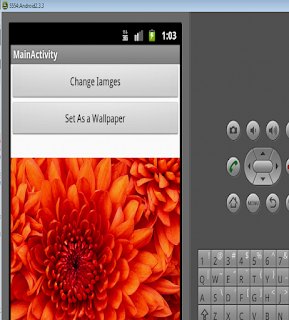
Screen shot of projects
Second one

....package com.example.allimagespath;
import java.io.File;
import java.io.FileInputStream;
import java.io.FileNotFoundException;
import java.io.IOException;
import java.io.InputStream;
import java.util.ArrayList;
import android.net.Uri;
import android.os.Bundle;
import android.provider.MediaStore;
import android.app.Activity;
import android.app.WallpaperManager;
import android.content.ContentResolver;
import android.content.Context;
import android.database.Cursor;
import android.graphics.Bitmap;
import android.graphics.BitmapFactory;
import android.util.Log;
import android.view.Menu;
import android.view.View;
import android.widget.Button;
import android.widget.ImageView;
import android.widget.Toast;
public class MainActivity extends Activity {
ArrayList mStringList= new ArrayList();
private int i=0;
private ImageView iv;
String[] mStringArray ;
private Button btnWall;
private ContentResolver cr;
private Button btnImagesPath;
@Override
public void onCreate(Bundle savedInstanceState) {
super.onCreate(savedInstanceState);
setContentView(R.layout.activity_main);
iv=(ImageView) findViewById(R.id.imageView1);
cr=this.getContentResolver();
btnWall=(Button) findViewById(R.id.button2);
btnImagesPath=(Button) findViewById(R.id.button3);
String[] img = { MediaStore.Images.Thumbnails._ID, MediaStore.Images.Media.DATA ,MediaStore.Images.Thumbnails.DATA};
Cursor cursor = managedQuery(android.provider.MediaStore.Images.Media.EXTERNAL_CONTENT_URI, img, null, null, null);
while (cursor.moveToNext()) {
String path= cursor.getString(cursor.getColumnIndex(MediaStore.Images.Thumbnails.DATA));
// String name= cursor.getString(cursor.getColumnIndex(MediaStore.Images.Media.DISPLAY_NAME));
mStringList.add(path);
}
mStringArray = new String[mStringList.size()];
mStringArray = mStringList.toArray(mStringArray);
Button btn=(Button) findViewById(R.id.button1);
btn.setOnClickListener(new View.OnClickListener() {
public void onClick(View arg0) {
// TODO Auto-generated method stub
setImage();
}
});
btnWall.setOnClickListener(new View.OnClickListener() {
public void onClick(View arg0) {
// TODO Auto-generated method stub
setWallpaper(getBaseContext());
}
});
btnImagesPath.setOnClickListener(new View.OnClickListener() {
public void onClick(View arg0) {
// TODO Auto-generated method stub
allPath();
}
});
}
@Override
public boolean onCreateOptionsMenu(Menu menu) {
getMenuInflater().inflate(R.menu.activity_main, menu);
return true;
}
public void setImage() {
// TODO Auto-generated method stub
iv.setImageURI(Uri.parse(mStringArray[i]));
i++;
Toast.makeText(getBaseContext(), "...."+i, Toast.LENGTH_SHORT).show();
if(i>=(mStringArray.length-1))
{
i=0;
}
}
public void setWallpaper(Context c)
{
Bitmap bitmap = null;
WallpaperManager myWallpaperManager
= WallpaperManager.getInstance(getApplicationContext());
try {
//myWallpaperManager.setResource(R.drawable.android);
File file=new File(mStringArray[i]);
try {
bitmap = BitmapFactory.decodeStream(new FileInputStream(file), null, null);
} catch (FileNotFoundException e) {
e.printStackTrace();
}
if(bitmap!=null)
{
// myWallpaperManager.setStream(new FileInputStream(file));
myWallpaperManager.setBitmap(bitmap);
bitmap.recycle();
}
} catch (IOException e) {
// TODO Auto-generated catch block
e.printStackTrace();
}
}
public void allPath()
{
String[] img = { MediaStore.Images.Thumbnails._ID, MediaStore.Images.Media.DATA };
Cursor c=cr.query(android.provider.MediaStore.Images.Media.EXTERNAL_CONTENT_URI, img, null, null, null);
// Cursor cursor = managedQuery(android.provider.MediaStore.Images.Media.EXTERNAL_CONTENT_URI, img, null, null, null);
while (c.moveToNext()) {
String path= c.getString(c.getColumnIndex(MediaStore.Images.Thumbnails.DATA));
// String name= cursor.getString(cursor.getColumnIndex(MediaStore.Images.Media.DISPLAY_NAME));
mStringList.add(path);
}
mStringArray = new String[mStringList.size()];
mStringArray = mStringList.toArray(mStringArray);
for(int i = 0; i < mStringArray.length ; i++){ Toast.makeText(getBaseContext(), ""+mStringArray[i], Toast.LENGTH_SHORT).show(); } } }
import java.io.File;
import java.io.FileInputStream;
import java.io.FileNotFoundException;
import java.io.IOException;
import java.io.InputStream;
import java.util.ArrayList;
import android.net.Uri;
import android.os.Bundle;
import android.provider.MediaStore;
import android.app.Activity;
import android.app.WallpaperManager;
import android.content.ContentResolver;
import android.content.Context;
import android.database.Cursor;
import android.graphics.Bitmap;
import android.graphics.BitmapFactory;
import android.util.Log;
import android.view.Menu;
import android.view.View;
import android.widget.Button;
import android.widget.ImageView;
import android.widget.Toast;
public class MainActivity extends Activity {
ArrayList
private int i=0;
private ImageView iv;
String[] mStringArray ;
private Button btnWall;
private ContentResolver cr;
private Button btnImagesPath;
@Override
public void onCreate(Bundle savedInstanceState) {
super.onCreate(savedInstanceState);
setContentView(R.layout.activity_main);
iv=(ImageView) findViewById(R.id.imageView1);
cr=this.getContentResolver();
btnWall=(Button) findViewById(R.id.button2);
btnImagesPath=(Button) findViewById(R.id.button3);
String[] img = { MediaStore.Images.Thumbnails._ID, MediaStore.Images.Media.DATA ,MediaStore.Images.Thumbnails.DATA};
Cursor cursor = managedQuery(android.provider.MediaStore.Images.Media.EXTERNAL_CONTENT_URI, img, null, null, null);
while (cursor.moveToNext()) {
String path= cursor.getString(cursor.getColumnIndex(MediaStore.Images.Thumbnails.DATA));
// String name= cursor.getString(cursor.getColumnIndex(MediaStore.Images.Media.DISPLAY_NAME));
mStringList.add(path);
}
mStringArray = new String[mStringList.size()];
mStringArray = mStringList.toArray(mStringArray);
Button btn=(Button) findViewById(R.id.button1);
btn.setOnClickListener(new View.OnClickListener() {
public void onClick(View arg0) {
// TODO Auto-generated method stub
setImage();
}
});
btnWall.setOnClickListener(new View.OnClickListener() {
public void onClick(View arg0) {
// TODO Auto-generated method stub
setWallpaper(getBaseContext());
}
});
btnImagesPath.setOnClickListener(new View.OnClickListener() {
public void onClick(View arg0) {
// TODO Auto-generated method stub
allPath();
}
});
}
@Override
public boolean onCreateOptionsMenu(Menu menu) {
getMenuInflater().inflate(R.menu.activity_main, menu);
return true;
}
public void setImage() {
// TODO Auto-generated method stub
iv.setImageURI(Uri.parse(mStringArray[i]));
i++;
Toast.makeText(getBaseContext(), "...."+i, Toast.LENGTH_SHORT).show();
if(i>=(mStringArray.length-1))
{
i=0;
}
}
public void setWallpaper(Context c)
{
Bitmap bitmap = null;
WallpaperManager myWallpaperManager
= WallpaperManager.getInstance(getApplicationContext());
try {
//myWallpaperManager.setResource(R.drawable.android);
File file=new File(mStringArray[i]);
try {
bitmap = BitmapFactory.decodeStream(new FileInputStream(file), null, null);
} catch (FileNotFoundException e) {
e.printStackTrace();
}
if(bitmap!=null)
{
// myWallpaperManager.setStream(new FileInputStream(file));
myWallpaperManager.setBitmap(bitmap);
bitmap.recycle();
}
} catch (IOException e) {
// TODO Auto-generated catch block
e.printStackTrace();
}
}
public void allPath()
{
String[] img = { MediaStore.Images.Thumbnails._ID, MediaStore.Images.Media.DATA };
Cursor c=cr.query(android.provider.MediaStore.Images.Media.EXTERNAL_CONTENT_URI, img, null, null, null);
// Cursor cursor = managedQuery(android.provider.MediaStore.Images.Media.EXTERNAL_CONTENT_URI, img, null, null, null);
while (c.moveToNext()) {
String path= c.getString(c.getColumnIndex(MediaStore.Images.Thumbnails.DATA));
// String name= cursor.getString(cursor.getColumnIndex(MediaStore.Images.Media.DISPLAY_NAME));
mStringList.add(path);
}
mStringArray = new String[mStringList.size()];
mStringArray = mStringList.toArray(mStringArray);
for(int i = 0; i < mStringArray.length ; i++){ Toast.makeText(getBaseContext(), ""+mStringArray[i], Toast.LENGTH_SHORT).show(); } } }
Add the wallpaper set permission to android manifest file
Screen shot of projects

Second one

Comments
Post a Comment